Module 6: Traffic Management
To gain advanced traffic control, you must deploy a Waypoint Proxy for the workload’s namespace. The traffic is then routed from the Ztunnel, through the Waypoint Proxy, and finally to the destination workload.
The following section describes some advanced traffic control capabilities:
-
Traffic Splitting: Uses
WaypointProxy-
Percentage-based routing (e.g., 90% to V1, 10% to V2).
-
-
Header-Based Routing: Uses
WaypointProxy-
Route traffic based on HTTP headers
-
-
Traffic Mirroring: Uses
WaypointProxy-
Shadowing a percentage of live traffic to a test service.
-
-
Fault Injection: Uses
WaypointProxy-
Injecting artificial delays or HTTP failure codes for resilience testing.
-
-
L4 Load Balancing: Uses
ZtunnelOnly-
Basic connection-level balancing (default behavior).
-
-
Timeouts/Retries: Uses
WaypointProxy-
Configuring application-level request timeouts and retries on failure.
-
Navigate to the subdirectory: 060-traffic-management
|
About Traffic Routing
Traffic routing is essential for strategies such as canary releases, A/B testing, and blue-green deployments.
OpenShift Service Mesh provides three core routing techniques:
-
Weighted routing: Distributes traffic across service versions based on percentage allocations, enabling controlled rollouts and gradual migrations.
-
Header-based routing: Routes traffic based on HTTP request headers, supporting user segmentation and feature flags.
-
Path-based routing: Routes traffic based on the request URI path, enabling API versioning and endpoint-specific routing.
Task 1: Create Waypoint proxies
The waypoint proxy is the place where Istio in ambient mode enforces Layer 7 policies. Creating one waypoint per namespace is considered a best practice because it aligns perfectly with Kubernetes’ natural isolation boundary: the namespace.
Create a waypoint for the travel-portal and travel-agency namespace:
apiVersion: gateway.networking.k8s.io/v1
kind: Gateway
metadata:
  labels:
    istio.io/waypoint-for: service
  name: waypoint-travel-agency
  namespace: travel-agency
spec:
  gatewayClassName: istio-waypoint
  listeners:
  - name: mesh
    port: 15008
    protocol: HBONE
---
apiVersion: gateway.networking.k8s.io/v1
kind: Gateway
metadata:
  labels:
    istio.io/waypoint-for: service
  name: waypoint-travel-portal
  namespace: travel-portal
spec:
  gatewayClassName: istio-waypoint
  listeners:
  - name: mesh
    port: 15008
    protocol: HBONE
oc apply -f 01-waypoints-create.yamlTask 2: Enroll the travel application namespaces to use waypoints
Now enroll the services in the namespaces to use the waypoints for L7 traffic:
apiVersion: v1
kind: Namespace
metadata:
  labels:
    istio-discovery: enabled
    istio.io/dataplane-mode: ambient
    istio.io/use-waypoint:  waypoint-travel-agency
  name: travel-agency
spec: {}
---
apiVersion: v1
kind: Namespace
metadata:
  labels:
    istio-discovery: enabled
    istio.io/dataplane-mode: ambient
    istio.io/use-waypoint: waypoint-travel-portal
  name: travel-portal
spec: {}
oc apply -f 02_1-ns-use-waypoints.yamlAfter enrolling the namespace, requests from any pods using the ambient data plane to services in travel-portal and travel-agency will route through the waypoint for L7 processing and policy enforcement.
Confirm that the waypoint proxy is used by all the services in the travel-portal and travel-agency namespaces:
istioctl ztunnel-config svc --namespace ztunneltravel-agency cars 172.30.123.174 waypoint-travel-agency 1/1
travel-agency discounts 172.30.67.195 waypoint-travel-agency 1/1
travel-agency flights 172.30.28.227 waypoint-travel-agency 1/1
travel-agency hotels 172.30.237.136 waypoint-travel-agency 1/1
travel-agency insurances 172.30.200.242 waypoint-travel-agency 1/1
travel-agency mysqldb 172.30.116.248 waypoint-travel-agency 1/1
travel-agency travels 172.30.150.117 waypoint-travel-agency 1/1
travel-agency waypoint-travel-agency 172.30.155.226 None 1/1
travel-control control 172.30.171.212 travel-control-waypoint 1/1
travel-control travel-control-waypoint 172.30.31.88 None 1/1
travel-control travel-gateway-istio 172.30.58.61 travel-control-waypoint 1/1
travel-control-sidecar control 172.30.234.8 None 1/1
travel-portal travels 172.30.235.132 waypoint-travel-portal 1/1
travel-portal viaggi 172.30.125.155 waypoint-travel-portal 1/1
travel-portal voyages 172.30.133.148 waypoint-travel-portal 1/1
travel-portal waypoint-travel-portal 172.30.56.159 None 1/1Task 3: Enable tracing for the Waypoint proxies
In order to see traces, we have to enable tracing for these two waypoints:
apiVersion: telemetry.istio.io/v1
kind: Telemetry
metadata:
  name: telemetry-waypoint-travel-agency
  namespace: travel-agency
spec:
  targetRefs:
  - kind: Gateway
    name: waypoint-travel-agency
    group: gateway.networking.k8s.io
  tracing:
  - providers:
    - name: "otel"
    randomSamplingPercentage: 50
---
apiVersion: telemetry.istio.io/v1
kind: Telemetry
metadata:
  name: telemetry-waypoint-travel-portal
  namespace: travel-portal
spec:
  targetRefs:
  - kind: Gateway
    name: waypoint-travel-portal
    group: gateway.networking.k8s.io
  tracing:
  - providers:
    - name: "otel"
    randomSamplingPercentage: 50
oc apply -f 02_2-enable-tracing.yamlTask 4: Traffic Splitting
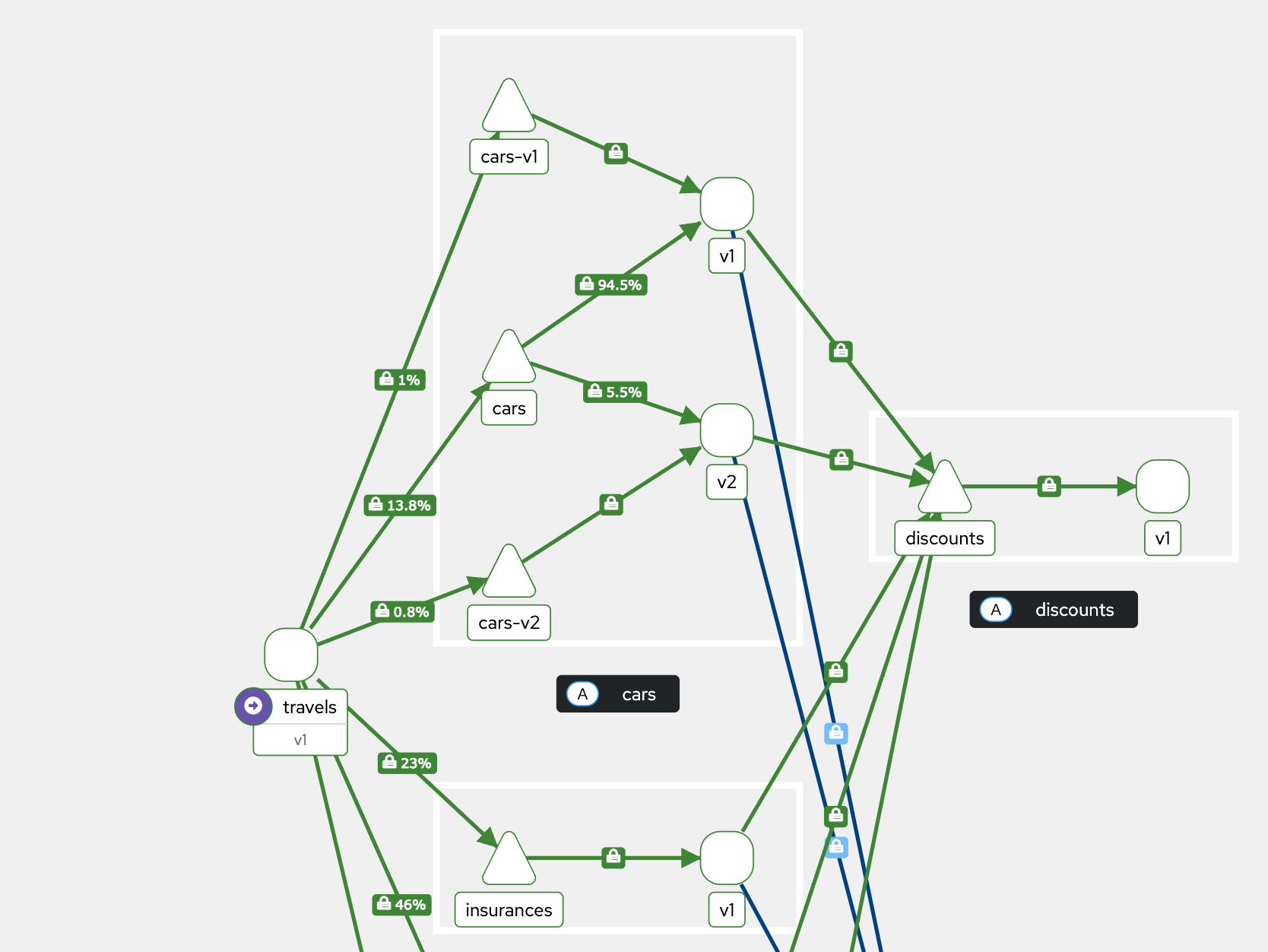
In this section we want to split traffic accross two versions of a service. This is useful for A/B tests and canary rollouts.
Step 1: Create a second version of the cars service deployment:
oc apply -f 05-cars-app-v2.yamlStep 2: Create Kubernetes services for version v1 and v2:
oc apply -f 06-cars-services.yamlStep 3: Apply a traffic splitting policy:
apiVersion: gateway.networking.k8s.io/v1
kind: HTTPRoute
metadata:
  name: cars-traffic-split
  namespace: travel-agency
spec:
  parentRefs:
  - group: ""
    kind: Service
    name: cars
    port: 8000
  rules:
  - backendRefs:
    - name: cars-v1
      port: 8000
      weight: 70
    - name: cars-v2
      port: 8000
      weight: 30
oc apply -f 07-cars-traffic-split.yamlStep 4: Observe the traffic splitting in Kiali
Clean up:
oc delete -f 07-cars-traffic-split.yamlTask 5: Traffic Redirect
We can use a HTTPRoute to redirect traffic.
In this scenario we redirect travel requests for Madrid going to the travels API service, to Amsterdam.
First make a request for Madrid:
oc exec $(oc get pod -l app=cars -n travel-agency -o jsonpath='{.items[0].metadata.name}') -n travel-agency -- curl -sSv travels.travel-agency.svc.cluster.local:8000/travels/MadridNext apply the Redirect policy:
apiVersion: gateway.networking.k8s.io/v1
kind: HTTPRoute
metadata:
  name: travels-madrid-redirect-route
  namespace: travel-agency
spec:
  parentRefs:
  - group: ""
    name: travels
    kind: Service
    namespace: travel-agency
  rules:
    - matches:
        - path:
            type: PathPrefix
            value: /travels/Madrid
      filters:
        - type: RequestRedirect
          requestRedirect:
            path:
              type: ReplacePrefixMatch
              replacePrefixMatch: /travels/Amsterdam
    - backendRefs:
      - name: travels
        port: 8000
oc apply -f 08-travel-redirect.yamlNow make a request for Madrid again and notice that you got a Redirect:
oc exec $(oc get pod -l app=cars -n travel-agency -o jsonpath='{.items[0].metadata.name}') -n travel-agency -- curl -sSv travels.travel-agency.svc.cluster.local:8000/travels/Madrid* About to connect() to travels.travel-agency.svc.cluster.local port 8000 (#0)
* Trying 172.30.150.117...
* Connected to travels.travel-agency.svc.cluster.local (172.30.150.117) port 8000 (#0)
> GET /travels/Madrid HTTP/1.1
> User-Agent: curl/7.29.0
> Host: travels.travel-agency.svc.cluster.local:8000
> Accept: */*
>
< HTTP/1.1 302 Found
< location: http://travels.travel-agency.svc.cluster.local:8000/travels/Amsterdam
< date: Thu, 15 Jan 2026 12:50:52 GMT
< server: istio-envoy
< x-envoy-decorator-operation: travel-agency~travels.travel-agency.svc.cluster.local:8000/*
< content-length: 0Clean up:
oc delete -f 08-travel-redirect.yamlTask 6: Traffic Rewrite
Instead of redirecting the client to the new URL, it would be more appropriate to use a rewrite policy in this case.
Create the rewrite policy:
apiVersion: gateway.networking.k8s.io/v1
kind: HTTPRoute
metadata:
  name: travels-madrid-rewrite-route
  namespace: travel-agency
spec:
  parentRefs:
  - group: ""
    name: travels
    kind: Service
    namespace: travel-agency
  rules:
    - matches:
        - path:
            type: PathPrefix
            value: /travels/Madrid
      filters:
        - type: URLRewrite
          urlRewrite:
            path:
              type: ReplacePrefixMatch
              replacePrefixMatch: /travels/Amsterdam
      backendRefs:
      - name: travels
        port: 8000
oc apply -f 09-travel-rewrite.yamlNow send a request for Madrid again, and you’ll get back the data for Amsterdam:
oc exec $(oc get pod -l app=cars -n travel-agency -o jsonpath='{.items[0].metadata.name}') -n travel-agency -- curl -sSv travels.travel-agency.svc.cluster.local:8000/travels/Madrid* About to connect() to travels.travel-agency.svc.cluster.local port 8000 (#0)
* Trying 172.30.150.117...
* Connected to travels.travel-agency.svc.cluster.local (172.30.150.117) port 8000 (#0)
> GET /travels/Madrid HTTP/1.1
> User-Agent: curl/7.29.0
> Host: travels.travel-agency.svc.cluster.local:8000
> Accept: */*
>
{"city":"Amsterdam","coordinates":null,"createdAt":"2026-01-15T13:11:31Z","status":"Valid","flights":[{"airline":"Red Airlines","price":1001},{"airline":"Blue Airlines","price":351},{"airline":"Green Airlines","price":301}],"hotels":[{"hotel":"Grand Hotel Amsterdam","price":505},{"hotel":"Little Amsterdam Hotel","price":82}],"cars":[{"carModel":"Sports Car","price":1005},{"carModel":"Economy Car","price":302}],"insurances":[{"company":"Yellow Insurances","price":308},{"company":"Blue Insurances","price":57}]}
< HTTP/1.1 200 OK
< content-type: application/json
< date: Thu, 15 Jan 2026 13:11:31 GMT
< content-length: 515
< x-envoy-upstream-service-time: 170
< server: istio-envoy
< x-envoy-decorator-operation: travels.travel-agency.svc.cluster.local:8000/*Clean up:
oc delete -f 09-travel-rewrite.yamlTask 7: Traffic Mirroring
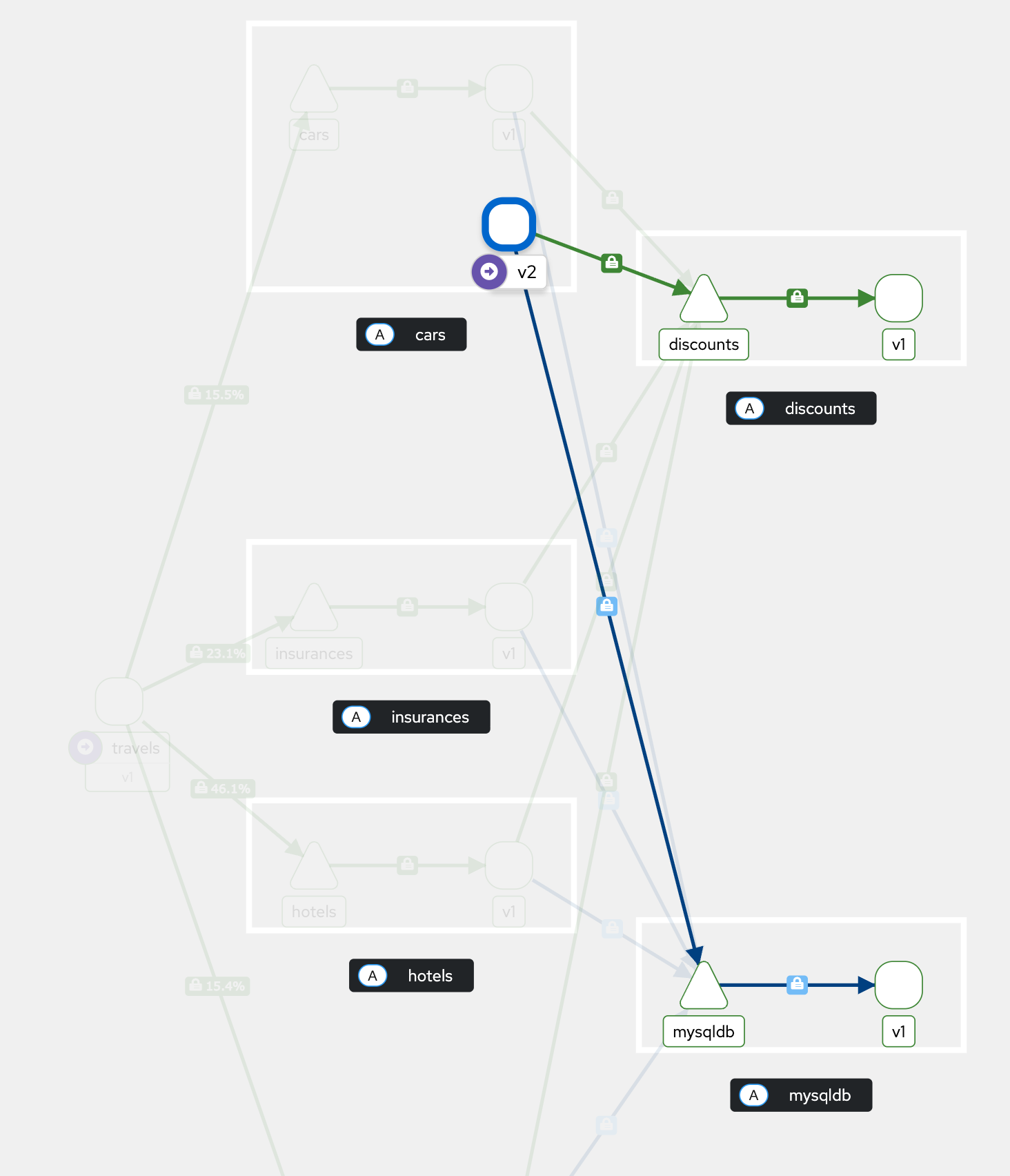
Traffic mirroring (also called shadowing) in Istio means: A copy of real production traffic is sent to another service, without affecting the original request or response. The client still talks only to the primary service. The mirrored service receives the same request, but its response is ignored.
Client
  |
  |----> Primary service (real response used)
  |
  |----> Mirrored service (copy, response discarded)
No extra latency is added to the client path, because Istio does not wait for the mirror.
Typical use cases:
-
Testing a new version in production
-
Performance Benchmarking
-
Migration of services (runtimes, databases, switching cloud providers)
-
API contract validation
In our scenario we have already two versions of the cars service deployed in the travel-agency namespace.
Make sure you have cleaned up the traffic splitting policy.
The following policy will mirror 100% of the traffic going to the cars service to the cars-v2 service.
apiVersion: gateway.networking.k8s.io/v1
kind: HTTPRoute
metadata:
  name: traffic-mirroring-cars-v2
  namespace: travel-agency
spec:
  parentRefs:
  - group: ""
    kind: Service
    name: cars
    port: 8000
  rules:
  - filters:
    - type: RequestMirror
      requestMirror:
        percentage: 100
        backendRef:
          name: cars-v2
          port: 8000
    backendRefs:
    - name: cars
      port: 8000
Create the mirroring policy:
oc apply -f 010-traffic-mirroring.yamlNow check the logs of the cars-v2 pods. You should see incoming requests:
oc logs --follow -n travel-agency deployment/cars-v2In Kiali you won’t see incoming traffic, but outgoing traffic for the cars-v2 service.
Clean up:
oc delete -f 010-traffic-mirroring.yamlTask 8: Scaling of Waypoint Proxies
Waypoints run as standalone workloads, so they can be scaled like any other OpenShift resource.
We use a Horizontal Pod Autoscaler for the travel portal waypoint Deployment and specify replicas between 2 and 5:
apiVersion: autoscaling/v2
kind: HorizontalPodAutoscaler
metadata:
  name: waypoint-travel-portal-hpa
  namespace: travel-portal
spec:
  scaleTargetRef:
    apiVersion: apps/v1
    kind: Deployment
    name: waypoint-travel-portal
  minReplicas: 2
  maxReplicas: 5
  metrics:
  - type: Resource
    resource:
      name: cpu
      target:
        type: Utilization
        averageUtilization: 50
oc apply -f 03-waypoint-hpa.yamlTask 9: Pod Disruption Budget for Waypoint Proxies
We can further increase the availability of waypoints by using PodDisruptionBudgets. This PodDisruptionBudget (PDB) is there to protect the waypoint proxy from being taken completely down by voluntary disruptions. Your waypoint is critical because it is the L7 enforcement point.
With this PDB, OpenShift must always keep at least one waypoint pod running.
apiVersion: policy/v1
kind: PodDisruptionBudget
metadata:
  name: waypoint-travel-portal-pdb
  namespace: travel-portal
spec:
  minAvailable: 1
  selector:
    matchLabels:
      gateway.networking.k8s.io/gateway-name: waypoint-travel-portal
oc apply -f 04-waypoint-pdb.yaml| Congratulations! You have completed Module 6: Traffic Management in Ambient Mode. |