OpenShift Service Mesh Ambient Mode
Explore OpenShift Service Mesh - Ambient Mode, based on Istio service mesh without sidecars.
About Ambient Mode
Istio ambient mode introduces a new way to manage service mesh without using traditional sidecar proxies. The biggest change is how it separates network traffic processing into two distinct layers, which is the core architectural difference. This architecture simplifies networking, reduces resource usage, and improves security while supporting the same service mesh use cases.
Ambient mode uses a different data plane architecture that splits traffic processing between a per-node Layer 4 (L4) proxy called Ztunnel (Zero-Trust Tunnel) and an optional Layer 7 (L7) proxy called waypoint proxy.
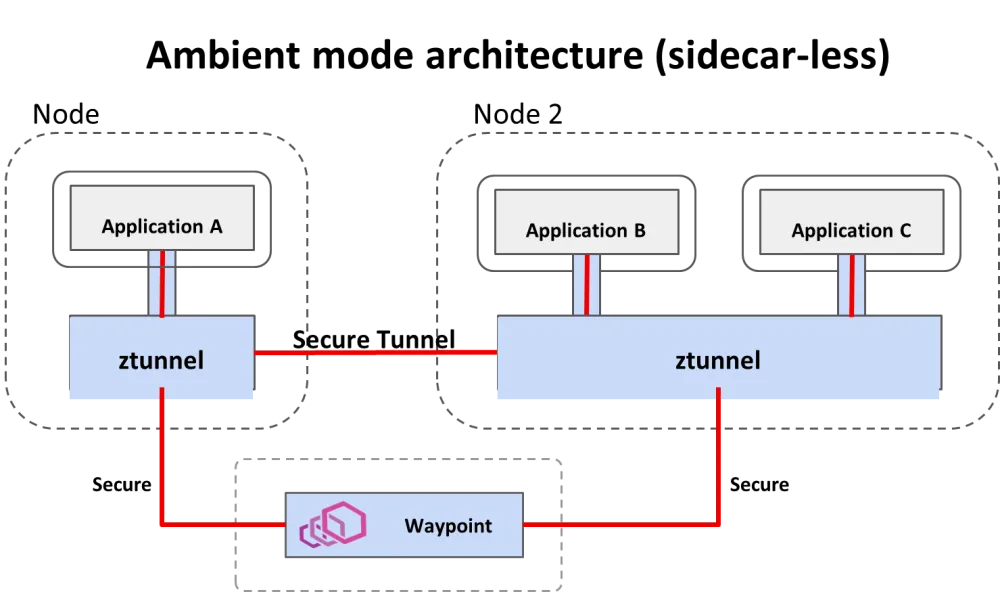
Ambient Mode also exclusively uses the Kubernetes Gateway API (using Gateway, HTTPRoute, TCPRoute) for its traffic configuration, moving away from Istio’s legacy VirtualService and DestinationRule for L7 routing.
Task 1: Install the prerequisites
Operators
Log in to your OpenShift environment and install the following Operators from Operator Hub:
-
Kiali Operator (provided by Red Hat)
-
Red Hat OpenShift Service Mesh 3
-
Tempo Operator (provided by Red Hat)
-
Red Hat build of OpenTelemetry (provided by Red Hat)
Kubernetes Gateway API
-
Install the
Kubernetes Gateway API, if not available:
oc get crd gateways.gateway.networking.k8s.io &> /dev/null || \
{ oc apply -f https://github.com/kubernetes-sigs/gateway-api/releases/download/v1.2.0/standard-install.yaml; }Lab modules overview
This lab is divided into several modules that guide you through the process of installing, configuring, and using OpenShift Service Mesh in Ambient Mode. Each module focuses on a specific aspect of Ambient Mode, providing hands-on experience and practical knowledge.
Module 1: Install OpenShift Service Mesh Ambient Mode
Navigate to Install OpenShift Service Mesh Ambient Mode and follow the instructions.
Module 2: Enable Service Mesh Observability
Red Hat OpenShift Observability provides real-time visibility, monitoring, and analysis of various system metrics, logs, and events to help you quickly diagnose and troubleshoot issues before they impact systems or applications.
Navigate to Enable Service Mesh Observability and follow the instructions.
Module 3: Install the Distributed Tracing Stack
You can integrate Red Hat OpenShift Service Mesh with Red Hat OpenShift distributed tracing data collection to instrument, generate, collect, and export OpenTelemetry traces, metrics, and logs to analyze and understand your software’s performance and behavior.
Important!!
If you want to see traces, you need to enable the Waypoint Proxies (L7) for the services you are observing, because it is not possible to see full distributed traces (with spans for each service hop) with Tempostack (Tempo/Jaeger) when your workloads are using only the L4 Ztunnel.
Navigate to Install the Distributed Tracing Stack and follow the instructions.
Module 4: Install the Kiali Travel demo application in ambient mesh
This demo application is based on the Kiali Travel Demo Tutorial and will deploy several services grouped into three namespaces.
The Travel Demo application simulates two business domains organized in different namespaces.
-
In a first namespace called travel-portal there will be deployed several travel shops, where users can search for and book flights, hotels, cars or insurance. All the portals consume a service called travels deployed in the travel-agency namespace.
-
A second namespace called travel-agency will host a set of services created to provide quotes for travel. A main travels service will be the business entry point for the travel agency.
-
The travel-control namespace runs a business dashboard, that acts as a travel shop simulator and sends requests to the travel portals.
Navigate to Install the Kiali Travel demo application and follow the instructions.
Module 5: Combining ambient and sidecar mode
Istio’s ambient mode is ideal for new mesh deployments. But it can be combined with sidecars within the same mesh. The sidecar proxy knows to use the HBONE protocol since the destination has been discovered to be an HBONE destination.
But the combination comes with some caveats:
-
Existing sidecar meshes will require an update (restart)
-
Traffic between sidecars and ambient workloads will bypass waypoints, meaning only L4 features are applied.
Navigate to Combining ambient and sidecar mode and follow the instructions.
Module 6: Traffic Management
Ambient Mode provides the full suite of Istio traffic management capabilities through a two-tiered architecture that prioritizes efficiency and incremental adoption. The key to traffic management in Ambient Mode is understanding when traffic is handled at Layer 4 (L4) versus when it is escalated to Layer 7 (L7).
-
Ztunnel: Handles L4 (TCP) traffic management, primarily security. It provides connection-level load balancing, mTLS encryption (using HBONE), and L4 authorization. It does not read HTTP headers.
-
Waypoint Proxy: Handles L7 (HTTP/gRPC) traffic management. This is where the advanced, application-aware features are enabled.
Navigate to Traffic Management and follow the instructions.
Module 7: Implementing Resilience
Istio and OpenShift Service Mesh provides powerful built-in features to implement resilience at the service mesh level, without changing application code. Key features include:
-
Retries: Automatically retry failed requests based on policies
-
Timeouts: Prevent requests from hanging indefinitely
-
Circuit breakers: Stop sending traffic to unhealthy services to avoid overload
-
Fault injection: Simulate failures and latency to test resilience
-
Load balancing strategies: Distribute traffic intelligently across instances
-
Outlier detection: Automatically eject misbehaving service instances
Navigate to Implementing Resilience and follow the instructions.
Module 8: Authentication and Authorization
Istio provides strong, built-in security capabilities at the service mesh level:
-
mTLS (Mutual TLS): Automatically encrypts traffic and authenticates workloads using identities
-
Workload identity: Each service gets a cryptographic identity based on its service account
-
Peer authentication: Control how services authenticate each other (strict, permissive, disabled)
-
Request authentication: Validate JWT tokens for end-user or external identity providers
-
Authorization policies: Fine-grained access control based on identity, namespace, paths, methods, headers, and claims
-
Default deny policies: Implement zero-trust by blocking all traffic unless explicitly allowed
-
Centralized enforcement: Security rules are enforced consistently without changing application code
With Istio, authentication and authorization become infrastructure concerns rather than application concerns. This module will show how to secure service-to-service communication and APIs in a uniform, declarative, and production-ready way.
Navigate to Authentication and Authorization and follow the instructions.